What’s new in Prodigi API v5

Tags
Interested in joining the world's leading print on demand platform?
If you already integrate with Prodigi through our print API, you’ll be familiar with some of the limitations of v4. While you can submit and retrieve orders, make certain changes before production and receive updates as they progress, much of the order control available in the Prodigi dashboard is out of reach through the API.
v5 gives you full control. Everything you can do with an order in the Prodigi dashboard, you can now do through the API.
That extends across the entire order lifecycle – from building and quoting an order through to managing it before production and tracking what happens afterwards.
And as our merchants’ integrations have become more sophisticated, we’ve made v5 easier and safer to build with too, with interactive documentation, separate test and live API usage, and more consistent behaviour throughout.
Here’s what’s changed.
Build and edit orders before submitting them
In v4, creating an order is largely a one-shot process. You send the order to Prodigi, then have a limited set of options for amending it before it reaches production.
v5 introduces a draft-first model.
You can create an order as a draft, then add or remove items, change quantities and sizes and update delivery details before submitting it for fulfilment.
This gives your integration more freedom to build an order progressively rather than having to assemble everything correctly before making the initial request.
If your existing integration suits the v4 approach, you don’t have to redesign your ordering flow just for the sake of it. v5 supports a submit: true flag when creating an order, allowing you to recreate the familiar create-and-submit behaviour in a single call.
Reach orders while they’re paused
One of the biggest practical changes in v5 is access to paused orders.
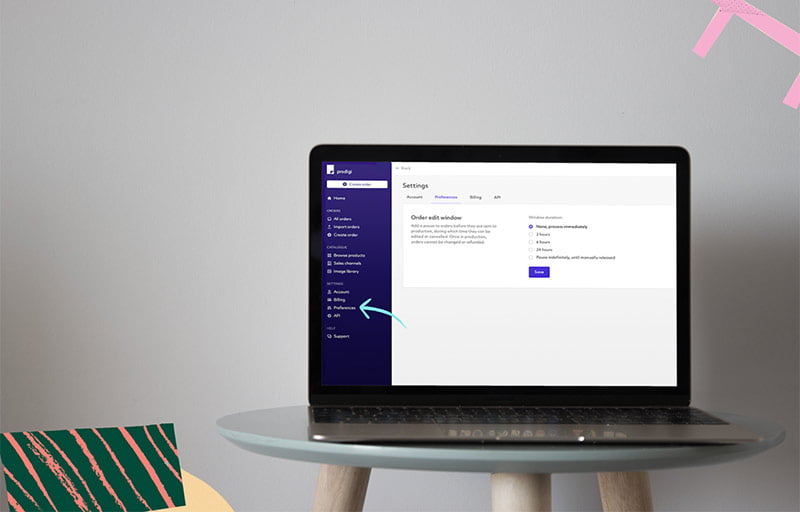
Prodigi’s order pause feature lets you hold submitted orders for a configurable period before they enter production. It gives you a window to catch any potential problems – an incorrect address, the wrong product or artwork that needs changing – before anything gets printed.
With v4, you can’t see or interact with an order through the API while it’s paused.
With v5, you can access paused orders directly through the API. When you’re confident everything is correct, you can resume an individual order and release it into production early.
Example: find and resume a paused order
First, find the orders currently held in your pause window by filtering by status:
curl "https://api.prodigi.com/v5/orders?status=paused" \
  --header "X-API-Key: live_00000000-0000-0000-0000-000000000000"
Each held order lists the actions currently available to it, including resume where applicable:
{
  "data": [
    {
      "id": "69117184988155392",
      "merchantReference": "my-order-1234",
      "status": "paused",
      "allowedActions": ["resume", "update", "cancel"]
    }
  ],
  "total": 1,
  "limit": 20,
  "offset": 0
}
Once you’ve identified the order you want to release, resume it to send it into production:
curl --request POST "https://api.prodigi.com/v5/orders/69117184988155392:resume" \
  --header "X-API-Key: live_00000000-0000-0000-0000-000000000000"
This is something merchants running highly automated integrations have asked us for directly. With v5, the pause window can become part of the integration itself rather than a safety feature that sits outside it.
Common scenarios where full order control helps
Full order control gives your integration more ways to respond when something changes after an order has been created but before it reaches production. For example:
- A customer spots the wrong shipping address after checking out
- The wrong artwork file has been added to a draft order and needs replacing before submission
- A customer asks to change the size or product they ordered before the order is submitted
- A customer cancels shortly after placing their order
Instead of handling these changes outside your integration, v5 gives you the tools to manage more of the order lifecycle programmatically, helping you catch mistakes before production and avoid unnecessary reprints. Once an order has been submitted – including while it’s paused – only the recipient’s delivery details can still be changed. For anything else, cancel the order and create a new one.
Get quotes before creating an order
v5 gives you dedicated quoting functionality before you commit to an order.
You can retrieve pricing, shipping and tax information, or get a combined order quote, giving your application the information it needs earlier in the checkout or ordering process.
That makes it easier to show accurate costs upstream, check costs before submitting an order or build your own commercial logic around Prodigi fulfilment.
See the full history of an order
v5 gives you considerably more visibility once an order has been submitted.
Alongside its current status, you can access its chronological history and shipments, including carrier and tracking information.
You can also raise an issue against an order through the API for problems such as damaged, incorrect or missing items, print quality or shipping.
The result is much greater visibility across the order lifecycle, without needing to switch to the dashboard to understand what has happened.
Upload, check and reuse artwork
v5 also introduces managed artwork.
Rather than relying solely on externally hosted artwork URLs, you can upload print files directly to Prodigi or import them from a URL. v5 checks that uploaded files meet supported file requirements, while the validation endpoint can flag potential resolution and aspect ratio issues for a selected catalogue variant (SKU) and print area.
Once uploaded, artwork can be reused across multiple orders.
Direct uploads support files up to 100MB, giving integrations another option for managing print assets without needing to maintain a publicly accessible file for every order.
Explore and test the API interactively
We’ve rebuilt the developer experience around v5 too.
The interactive v5 documentation is generated from the same specification as the API itself, helping keep the documentation and API contract in step as v5 evolves.
Add your API key and you can explore and test endpoints directly from the documentation, making it easier to understand requests and responses before building them into your integration.
Test safely before going live
Before placing live orders through v5, we strongly recommend testing your integration using your sandbox API key.
Sandbox and live use separate API keys. For testing, prefix your sandbox key with sandbox_. For live orders, prefix your live key with live_.
Both use the same v5 API base URL (https://api.prodigi.com/v5), so you don’t need to change endpoints when switching between testing and live orders.
You can find your live API key in the Prodigi dashboard and access your sandbox key through the sandbox dashboard.
Protect against duplicate orders
Retries are a fact of life when you’re building against an API. They shouldn’t result in the same print order being fulfilled twice.
v5 supports an Idempotency-Key header when creating an order. If your integration needs to retry the request, the key protects against duplicate order creation.
We’ve also standardised error responses, including field-level validation issues, so your application gets clearer information when a request can’t be processed.
v5 API keys are rate limited to 1,000 requests per hour, with standard rate-limit headers available to help your integration manage its usage.
How to migrate from v4 to v5 of our print API
If you’re already using v4, we’ve designed v5 to make moving your existing integration as straightforward as possible.
Your existing Prodigi SKUs can still be used as item identifiers. If your integration currently sends copies, v5 accepts it as a deprecated alias for quantity, while adding submit: true when creating an order reproduces v4’s one-step create-and-submit flow. Your existing per-order callback setup also works without changes.
There are some differences you’ll need to account for, including v5’s draft-first order model and how test and live API usage is handled, but you don’t necessarily need to redesign your entire ordering workflow to start using it.
Ready to make the move? Read our guide to migrating from v4 to v5 of our print API for a step-by-step walkthrough.
v4 isn’t going anywhere yet
If you already have a working v4 integration, there’s no immediate action required.
We’ll be supporting v4 for a long transition period, giving you plenty of time to decide when moving makes sense for your business. There’s no forced migration deadline at launch.
If you’re starting a new integration, however, v5 is the version to build against.
Start building with v5
v5 brings the print API in line with the way Prodigi already works elsewhere: one order model, with the same control available whether you’re working through the dashboard or building your own integration.
For existing API merchants, that means an API that can keep pace as your integration becomes more sophisticated, with more control available without having to leave your own systems.
For developers, it means a cleaner API with better tooling and a safer way to build and test integrations.
Using v4 of our print API? Read our v4 to v5 migration guide for a technical breakdown of what’s changed and how to move your integration across.
Further reading
-

Migrating from v3 to v4 of the Prodigi print API
18 March 2021
-

How to migrate from v4 to v5 of our print API
15 October 2026
-

How to place your first API order
18 October 2026
-
Maximise control & minimise mistakes with our new order pausing feature
2 May 2024